
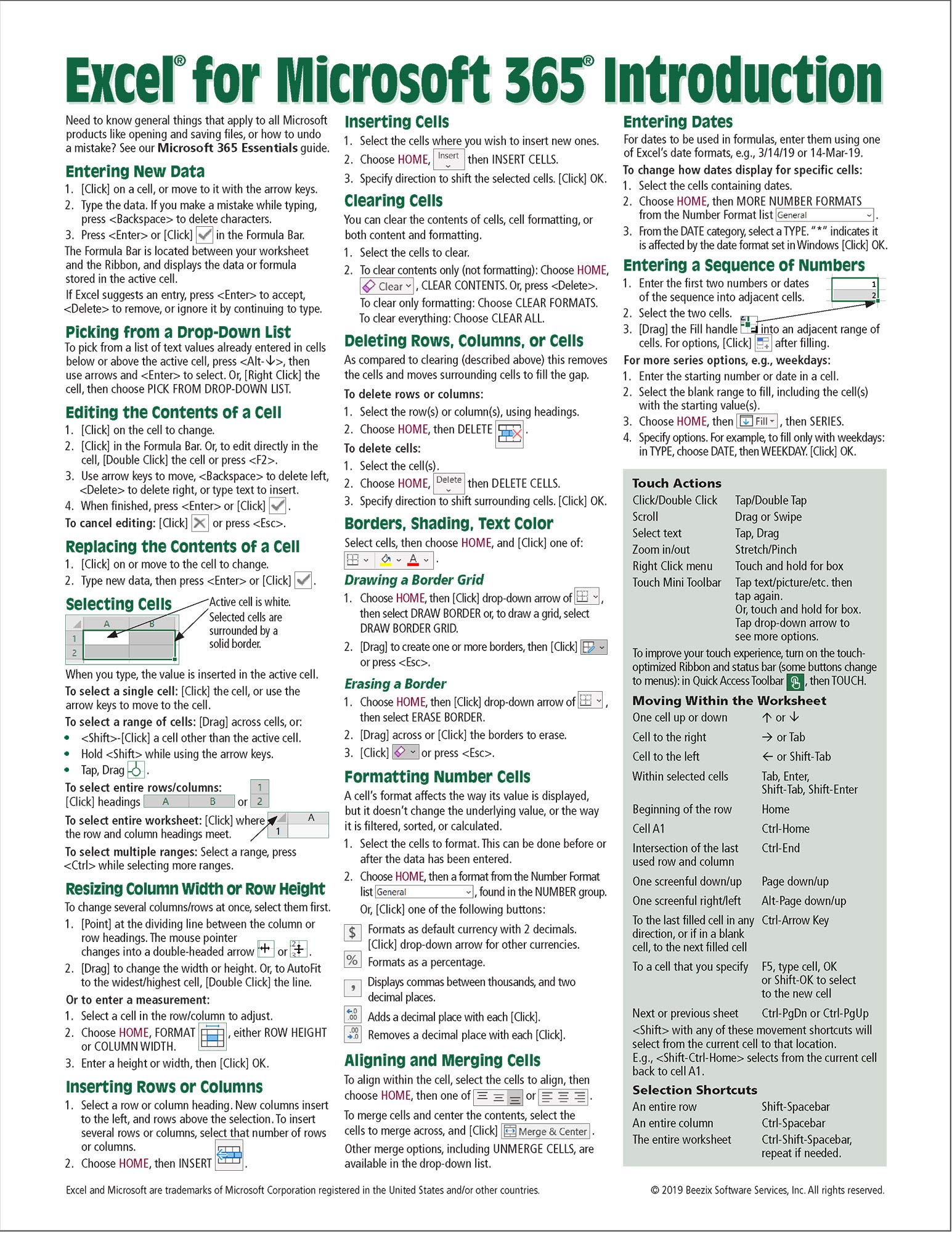
Title
Excel For Microsoft 365 (Office 365) Introduction Quick Reference Guide Windows Version (Cheat Sheet Of Instructions, Tips & S
Sold by Ergodebooks, an authorized reseller.
Returns accepted within 30 days | support@ergodebooks.com
Shipping Information
- Free Standard Shipping — United States only
- Processing Time: 3–5 business days
- Estimated Delivery: 6–10 business days after dispatch
- Double-boxed, fully insured & discreetly packaged
- Tracking number sent via email once dispatched
Returns & Refund
Returns accepted within 30 days of delivery.
Damaged or Defective Item
Free return shipping + replacement or full refund
Wrong Item Received
Free return shipping + replacement or full refund
Change of Mind
Return shipping at customer's expense · 25% restocking fee applies
Payment Option

Laminated Quick Reference Showing Stepbystep Instructions And Shortcuts For How To Use The Windows Version Of Excel For Microsoft 365 (Formerly Office 365). Written With Beezix'S Trademark Focus On Clarity, Accuracy, And The User'S Perspective, This Guide Will Be A Valuable Resource To Improve Your Proficiency In Using Microsoft Excel. This Guide Is Suitable As A Training Handout, Or Simply An Easy To Use Reference Guide, For Any Type Of User.The Following Topics Are Covered:Entering And Editing Datapicking From A Dropdown Listselecting Cellsresizing Column Width And Row Heightinserting And Deleting Rows, Columns And Cellsclearing Cells, Clearing Formattingborders, Shading, Text Colorformatting Numbersaligning And Merging Cellsentering Datesentering A Sequence Of Numbersentering Formulas & Functionsentering Sum And Other Functions Quicklyabsolute Vs. Relative Cell Referencescopying And Moving Data: Copying To Adjacent Cells; Cut, Copy, Paste; Drag & Dropsheet Features: Renaming, Moving, Copying, Selecting, Inserting, Deleting Sheets; Editing Multiple Worksheets Simultaneouslypreviewing, Printing And Page Setupfitting Printout To Pagesusing Page Break Preview To Adjust Page Breaksrepeating Rows/Columns On Every Pagealso Includes A List Of Touch Actions, Selection And Movement Shortcuts.Recommended Companion Title Covering Office Basics: Microsoft 365 Essentials (Isbn 9781944684778).Great As A Set With: Word For Microsoft 365 (Isbn 9781944684792); Powerpoint For Microsoft 365 (Isbn 9781944684808) Introduction Guides.
⚠️ WARNING (California Proposition 65):
This product may contain chemicals known to the State of California to cause cancer, birth defects, or other reproductive harm.
For more information, please visit www.P65Warnings.ca.gov.
- Q: What are the dimensions of the Excel quick reference guide? A: The guide measures ten point ninety-eight inches in length and eight point five inches in width. This size makes it portable and easy to handle.
- Q: How many pages does this guide have? A: The guide contains two pages. This compact format allows for quick access to essential information.
- Q: What binding type does the quick reference guide use? A: The guide is bound as a pamphlet. This binding ensures durability and ease of use.
- Q: Is this guide suitable for beginners? A: Yes, this guide is designed for users of all experience levels, including beginners. It provides clear, step-by-step instructions to help you learn Excel.
- Q: Can I use this guide for advanced Excel features? A: Yes, the guide covers advanced topics, making it useful for both beginners and advanced users. It includes instructions on formulas, functions, and data management.
- Q: How do I use this quick reference guide effectively? A: To use the guide, simply refer to it for step-by-step instructions and shortcuts while working in Excel. It's a handy tool for both training and daily use.
- Q: Is the quick reference guide laminated? A: Yes, the guide is laminated for durability. This feature makes it suitable for everyday use, protecting it from wear and tear.
- Q: Can I clean the laminated quick reference guide? A: Yes, you can clean the laminated surface with a damp cloth. This ensures that it stays in good condition for long-term use.
- Q: What should I do if the guide is damaged upon arrival? A: If the guide arrives damaged, you should contact customer support for assistance. They can help with returns or exchanges.
- Q: Does the guide include tips for printing in Excel? A: Yes, the guide includes tips for printing and page setup. You will learn how to preview printouts and adjust page settings.
- Q: Is this guide useful for training sessions? A: Yes, the guide can be used as a training handout for classes and workshops. Its clear layout makes it ideal for educational purposes.
- Q: Are there any companion guides recommended with this one? A: Yes, it is recommended to pair this guide with others like Microsoft 365 Essentials, Word, and PowerPoint guides. These cover additional Office applications.
- Q: What makes this guide user-friendly? A: The guide is designed with clarity and ease of use in mind, featuring straightforward instructions and a layout that is easy to navigate.
- Q: Is this guide available for other versions of Excel? A: No, this guide is specifically tailored for the Windows version of Excel for Microsoft 365. Other versions may require different resources.
- Q: Can I use this guide for self-study? A: Yes, this guide is perfect for self-study, providing essential tips and shortcuts to enhance your Excel skills at your own pace.