
Title


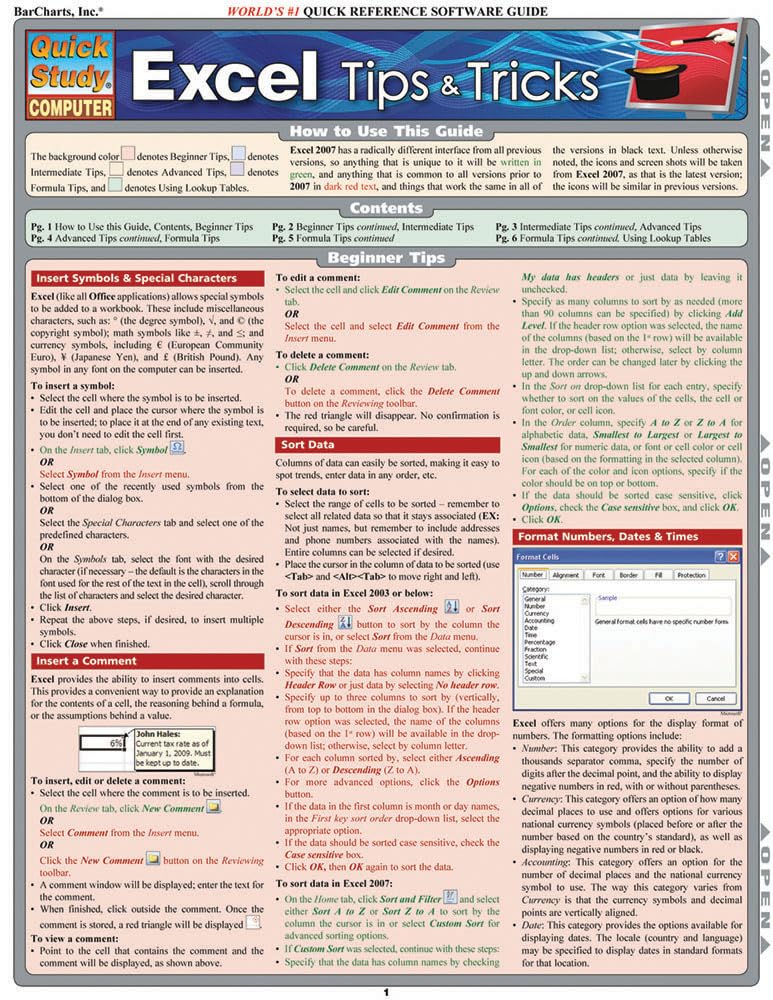
Excel Tips & Tricks Quickstudy Laminated Reference Guide (Quickstudy Computer)
Sold by Ergodebooks, an authorized reseller.
Returns accepted within 30 days | support@ergodebooks.com
Shipping Information
- Free Standard Shipping — United States only
- Processing Time: 3–5 business days
- Estimated Delivery: 6–10 business days after dispatch
- Double-boxed, fully insured & discreetly packaged
- Tracking number sent via email once dispatched
Returns & Refund
Returns accepted within 30 days of delivery.
Damaged or Defective Item
Free return shipping + replacement or full refund
Wrong Item Received
Free return shipping + replacement or full refund
Change of Mind
Return shipping at customer's expense · 25% restocking fee applies
Payment Option

Excel Tips & Tricks At Your Fingertips In 6 Laminated Pages.A Handy Resource For Beginning, Intermediate Or Advanced Excel Users, This 3Panel (6Page) Guide Is Jampacked With Information And Helpful, Timesaving Hints On Microsofts Awardwinning Spreadsheet Software. Featuring Easytosee Screen Captures And Icons, This Guide Is An Ideal Nexttothemonitor Reference.This 6Page Laminated Guide Includes The Following And More:Insert Symbols & Special Characters Insert A Comment Sort Data Format Numbers, Dates & Times Grouping & Outlining & Subtotals Conditional Formatting Convert Rows To Columns & Columns To Rows Add Header Or Footer Freeze Information On The Screen Check Formulas For Errors View Precedents & Dependents Absolute Referencing Relative Addressing Multisheet References
⚠️ WARNING (California Proposition 65):
This product may contain chemicals known to the State of California to cause cancer, birth defects, or other reproductive harm.
For more information, please visit www.P65Warnings.ca.gov.
- Q: How many pages does the Excel Tips & Tricks guide have? A: This guide contains six pages of laminated reference material, providing quick access to important Excel tips and tricks.
- Q: What are the dimensions of the QuickStudy Excel guide? A: The guide measures eight and a half inches in length, zero point zero eight inches in width, and eleven inches in height.
- Q: What type of binding does the Excel guide use? A: The guide is bound as a pamphlet, making it easy to flip through the pages for quick reference.
- Q: What skill levels is the Excel guide suitable for? A: This guide is designed for beginning, intermediate, and advanced Excel users, offering tips relevant to all skill levels.
- Q: How can I use the Excel Tips & Tricks guide effectively? A: You can use the guide as a quick reference while working in Excel, allowing you to find tips and tricks without interrupting your workflow.
- Q: Is this guide suitable for someone new to Excel? A: Yes, the guide is suitable for beginners as it includes essential tips and tricks to help them get started with Excel.
- Q: Can I use this guide for advanced Excel functions? A: Yes, the guide includes advanced functions and tips that are beneficial for more experienced users looking to enhance their skills.
- Q: How should I store the laminated guide to ensure its longevity? A: To keep the guide in good condition, store it flat in a dry place away from direct sunlight to prevent damage to the laminate.
- Q: What is the best way to clean the laminated pages? A: You can clean the laminated pages using a soft, damp cloth to wipe away any dirt or smudges without damaging the material.
- Q: Is the QuickStudy Excel guide a good resource for students? A: Yes, this guide is an excellent resource for students who need quick tips and references while using Excel for their coursework.
- Q: What features does the Excel guide include? A: The guide features tips on inserting symbols, sorting data, formatting, conditional formatting, and more to enhance your Excel experience.
- Q: What type of user would benefit the most from this guide? A: Users at all levels—beginner, intermediate, and advanced—will find valuable information and time-saving hints in this guide.
- Q: What should I do if I receive a damaged guide? A: If your guide arrives damaged, you should contact the retailer for their return policy and to arrange for a replacement.
- Q: Can I return the Excel Tips & Tricks guide if I'm not satisfied? A: Yes, most retailers offer a return policy, but be sure to check the specific terms and conditions for returns.
- Q: Does this guide contain any visual aids? A: Yes, the guide features easy-to-see screen captures and icons to help users understand the tips more effectively.
- Q: Who is the author of the QuickStudy Excel guide? A: The guide is authored by John Hales, who has expertise in creating educational resources for Excel users.