
Title
Word For Microsoft 365 (Office 365) Introduction Quick Reference Guide Windows Version (Cheat Sheet Of Instructions, Tips & Sh
Sold by Ergodebooks, an authorized reseller.
Returns accepted within 30 days | support@ergodebooks.com
Shipping Information
- Free Standard Shipping — United States only
- Processing Time: 3–5 business days
- Estimated Delivery: 6–10 business days after dispatch
- Double-boxed, fully insured & discreetly packaged
- Tracking number sent via email once dispatched
Returns & Refund
Returns accepted within 30 days of delivery.
Damaged or Defective Item
Free return shipping + replacement or full refund
Wrong Item Received
Free return shipping + replacement or full refund
Change of Mind
Return shipping at customer's expense · 25% restocking fee applies
Payment Option

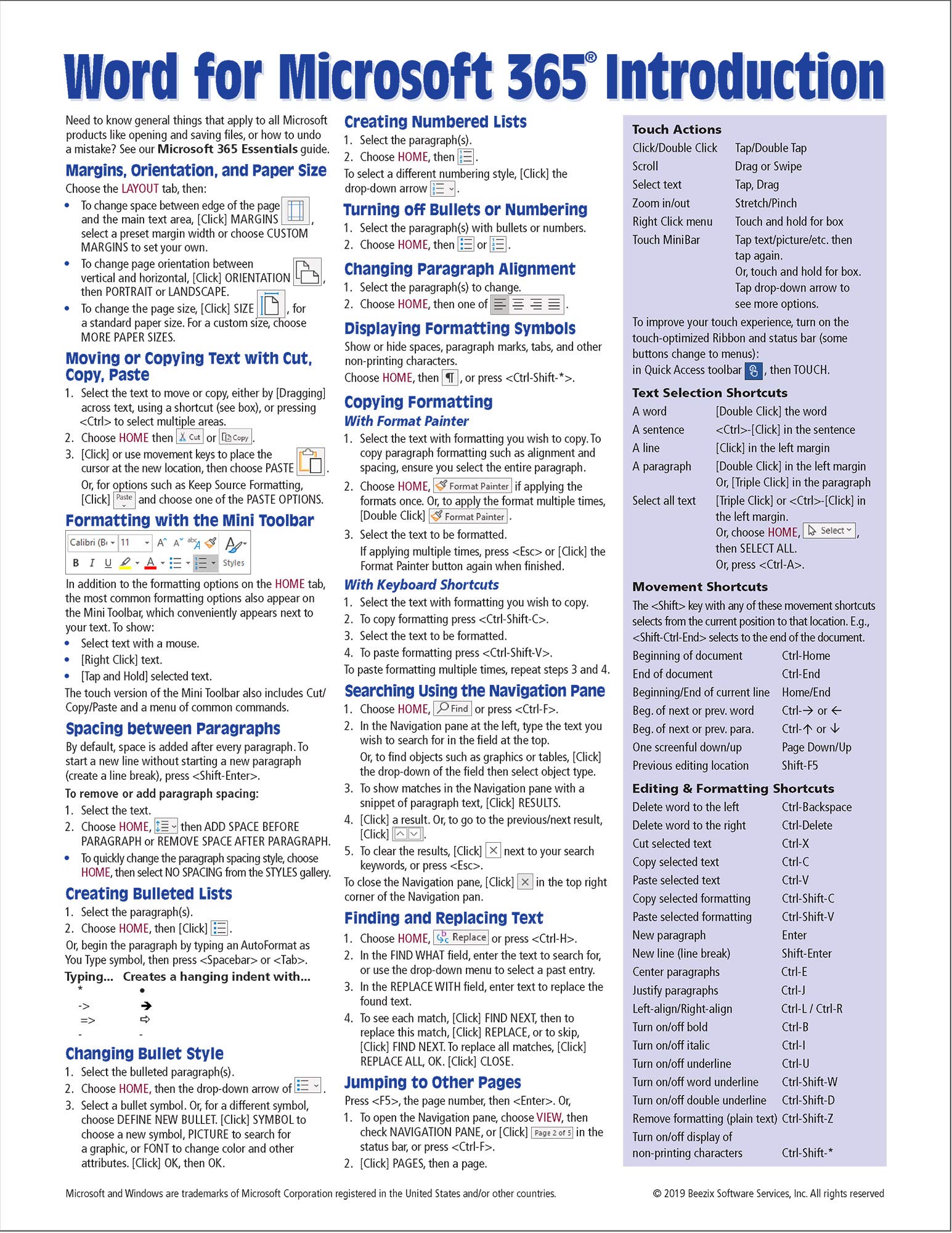
?? Laminated Quick Reference Guide For Using Microsoft 365 Word On Windows! Featuring Stepbystep Instructions And Shortcuts, This Guide By Beezix Focuses On Clarity And Userfriendliness. Perfect As A Training Handout Or Handy Reference For All Users.Topics Covered: ?? Page Setup: Margins, Orientation, Paper Size ?? Moving, Copying, And Formatting Text ?? Paragraph Spacing, Lists, Alignment ?? Navigation Pane, Find & Replace ?? Document Views: Read, Print Layout, Draft ?? Spellcheck, Grammar, Synonyms ?? Quick Parts, Cover Pages, Headers & Footers ??? Text Boxes, Page Breaks ??? Previewing & Printing, Envelopes & Labelsincludes Shortcuts For Touch Actions, Selection, Movement, Editing, And Formatting!? Suggested Companion: Microsoft 365 Essentials (Isbn 9781944684778). Pair With Excel For Microsoft 365 (Isbn 9781944684785) & Powerpoint For Microsoft 365 (Isbn 9781944684808) Guides!
⚠️ WARNING (California Proposition 65):
This product may contain chemicals known to the State of California to cause cancer, birth defects, or other reproductive harm.
For more information, please visit www.P65Warnings.ca.gov.
- Q: What are the dimensions of the quick reference guide? A: The dimensions of the guide are eleven inches by eight and a half inches. This size makes it easy to handle and store.
- Q: How many pages does the quick reference guide have? A: The guide contains two pages. This compact format ensures that essential information is easily accessible.
- Q: What binding type is used for the guide? A: The guide is bound as a pamphlet. This binding allows for flexibility and durability during use.
- Q: What topics are covered in this guide? A: The guide covers various topics such as page setup, text formatting, and spellcheck features. It's designed to enhance your Microsoft 365 Word experience.
- Q: Is this guide suitable for beginners? A: Yes, this guide is suitable for beginners. It offers step-by-step instructions that are user-friendly and clear.
- Q: Can I use this guide for training purposes? A: Yes, it is perfect as a training handout. The clarity and concise instructions make it ideal for teaching.
- Q: How should I store the quick reference guide? A: Store the guide in a dry place away from direct sunlight. This will help maintain its durability and readability.
- Q: Can I clean the laminated guide? A: Yes, you can clean the laminated guide. Wipe it down with a damp cloth to remove any dirt or smudges.
- Q: What if the guide arrives damaged? A: If the guide arrives damaged, you should contact customer support for a replacement. They will assist you with the return process.
- Q: Is there a warranty on the guide? A: No, there is no warranty for this quick reference guide. However, customer support is available for assistance.
- Q: Does this guide include shortcuts for touch actions? A: Yes, the guide includes shortcuts for touch actions and text formatting. This is particularly useful for touchscreen users.
- Q: Is this guide compatible with Mac computers? A: No, this guide is specifically designed for the Windows version of Microsoft Word. Mac users may need a different resource.
- Q: Are there other companion guides available? A: Yes, suggested companions include guides for Excel and PowerPoint. These can enhance your overall Microsoft 365 experience.
- Q: What makes this guide user-friendly? A: The guide is user-friendly due to its clear layout and step-by-step instructions. It is designed to cater to various user levels.
- Q: Is the guide suitable for professional use? A: Yes, the guide is suitable for professional use. It provides essential tips and shortcuts that can enhance productivity.